Want to learn how to compare travel insurance companies? You’ve come to the right place! Today, we’re going to guide you through comparing different travel insurance companies, and even comparing individual plans from one travel insurance company. But that’s not all. In this guide, I’ll show you why comparing travel insurance from different companies is something every traveler should do before securing their plan. You’ll gain insights into the various ways you can go about comparing plans, and of course, how to buy trip insurance step-by-step. Here’s how this guide will flow:
First, you’ll see why it’s a good idea to compare plans from different companies instead of relying on the singe option that is usually offered to you. You’re looking to protect your trip investment and stay safe, and you deserve options.
Second, I’ll show you the two strategies to compare your options. Whether you’re looking for the quick solution or want to spend some time researching, I’ll show you how.
Third, the you will see the step-by-step instructions for getting quotes for all companies, finding the best one for your trip, and purchasing for immediate coverage.
Finally, you’ll see my picks for the best travel insurance plans right now. As you can see, we’ve got a ton to cover today – so let’s not waste any more time! first things first: why should you learn how to compare travel insurance policies against each other?
Why Comparing Travel Insurance is Something Every Traveler Should do
You probably feel confused about where and how you should buy travel insurance. But, you’re probably also wondering – why is comparing the various travel insurance plans so important? Allow us to explain:
Travel supplier websites like airlines, aggregators, and cruise companies all sell travel insurance. You have probably seen the opt-in checkbox when booking a flight or hotel. Your travel agent/advisor probably has an option for insurance. Finally, there’s the option of using a travel insurance comparison engine to find a plan.
Travelers have 3 options for purchasing travel insurance:
- Travel suppliers or travel agents
- Direct from the travel insurance company
- Compare using a search engine (like CoverTrip)
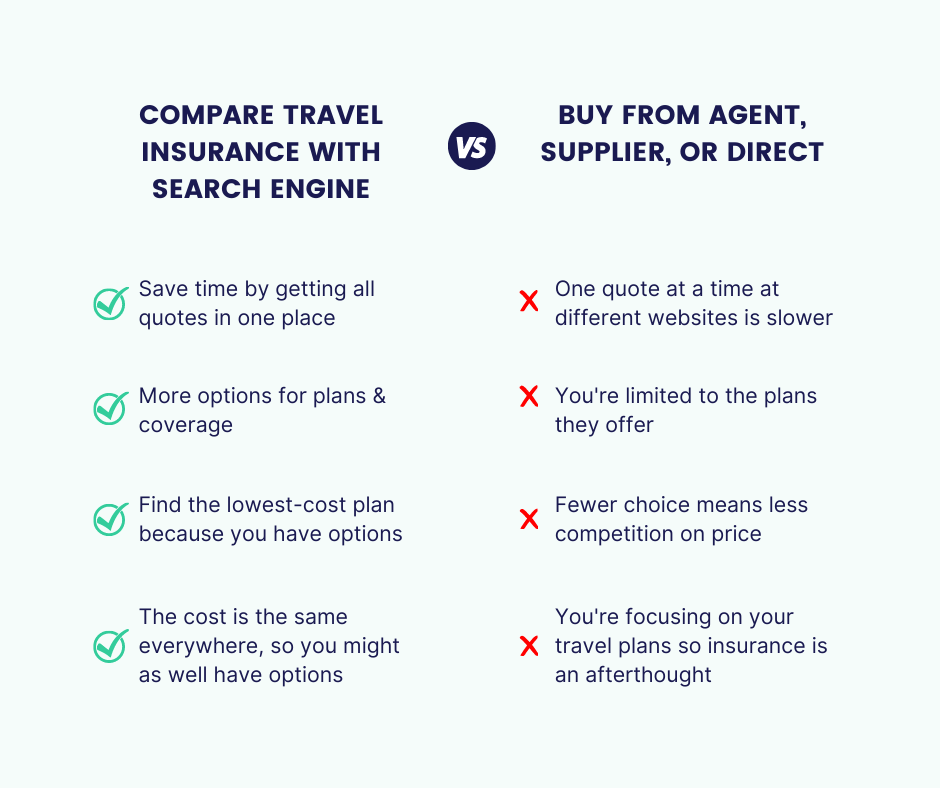
Purchasing travel insurance with a comparison search engine like CoverTrip (powered by Squaremouth) is faster, easier, and gives you more choices.
How To Compare Travel Insurance Plans: 2 Different Strategies
Ready to learn how to compare travel insurance plans? When you get a comparison quote there will be a lot of plans to choose from. This is both good and bad. It’s good because as you see above you get more options, you can compare them, and you see a lot of different plans at different prices. It’s bad because the choices can be overwhelming. How do you know which one is the best?
There are two types of people. Those that like to do their research, read all the details, and make sure they’re picking the right option. The other type does enough research to cover the essentials, then go with what is most popular. Depending on which bucket you fall into, your comparison recommendations will vary. Let’s start with the best way to go about comparing travel insurance plans: with a detailed, side-by-side comparison.
1. Detailed side-by-side comparison
If you are a thorough person and like to read all the details, you have the tools to do this. You can select plans, compare all of the coverage, and read the policy details. This is covered more in-depth below.
2. Simplified comparison
Here, you would compare plans based on the key information on the results screen, filter out plans that don’t fit, and select based on the what are the top-selling plans. We’ll also cover this below, as we recognize not everyone has the time or energy to filter through heaps of information.
Step By Step Guide On How To Compare Travel Insurance Plans
Now that you know the two methods you can follow for comparing travel insurance plans, let’s get into the main reason you came here today: to learn how to compare travel insurance plans! We’re going to go step by step to help you discover your perfect policy for an upcoming trip. Whether you’re traveling for pleasure or business, headed out on a quick trip or have no immediate plans of returning, this advice will prove invaluable in helping you secure the travel insurance plan that best suits your needs. First things first – let’s talk about what you need to get started comparing travel insurance plans:
Getting started: What you’ll need to compare travel insurance plans
To begin you will need to enter some basic information about your trip.
You don’t need to supply any personal details yet, just the basics about your trip. There is no obligation, you will see actual price quotes instantly, and if you find a plan you like you can complete the enrollment and purchase online.
Here’s what you will need to start:
- Destination
- Trip dates
- Traveler ages
- State of residency
- Trip cost
- Date of first trip payment
Step 1: Enter your trip information
Click the button below when you’re ready to start comparing travel insurance plans from all companies.
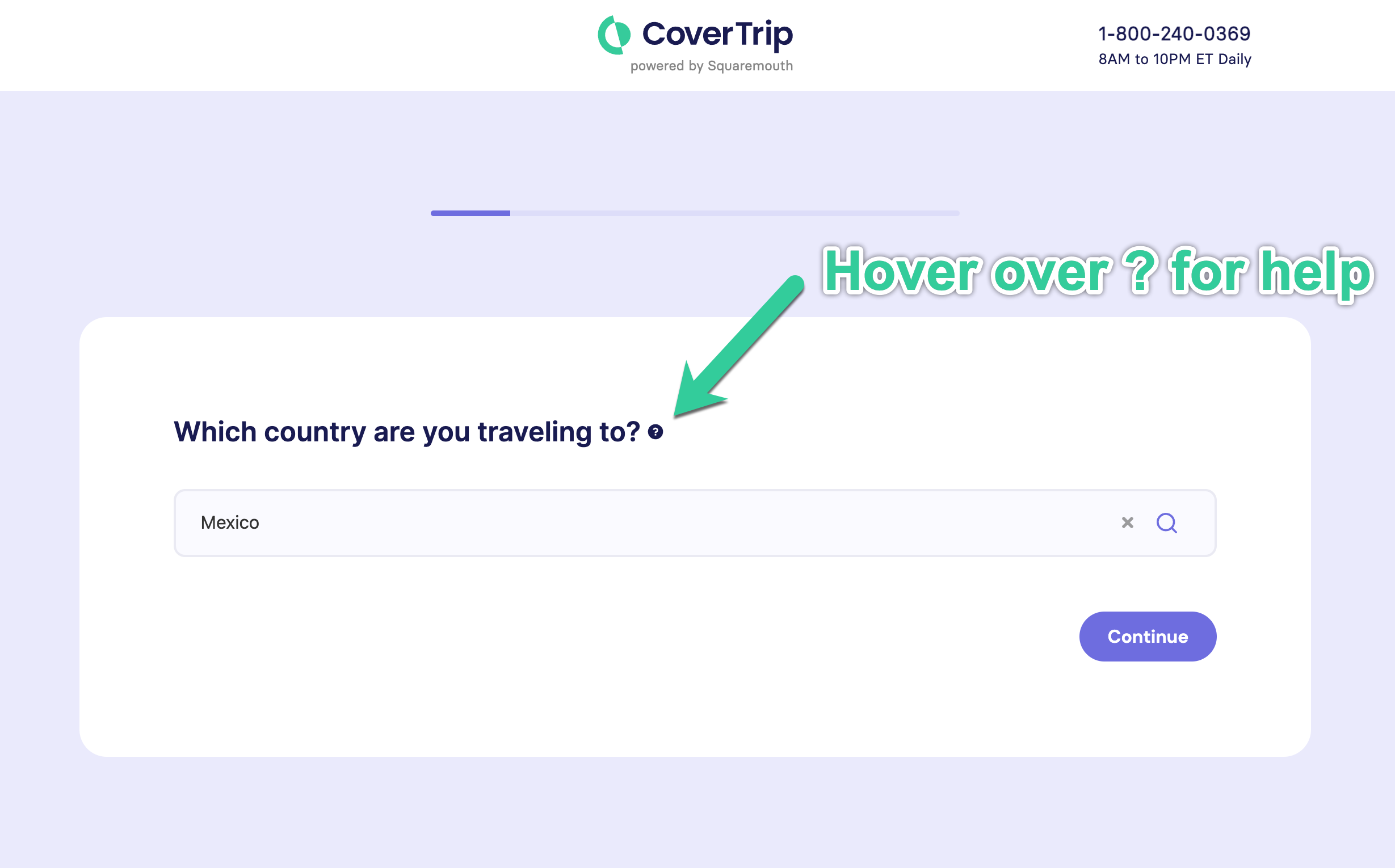
The following screens are where you enter your trip information. It includes destination, travel dates, traveler ages, residency state, trip cost, and deposit date.
Tip: If you are not sure about what a question is asking, hover over the ? to see a popup explanation.
Step 2: See your policy search results
Next, you will see the quote results screen. These are quotes for all plans from all major travel insurance companies.
There are several useful features here to help make your decision easier…let’s talk about the most important ones.
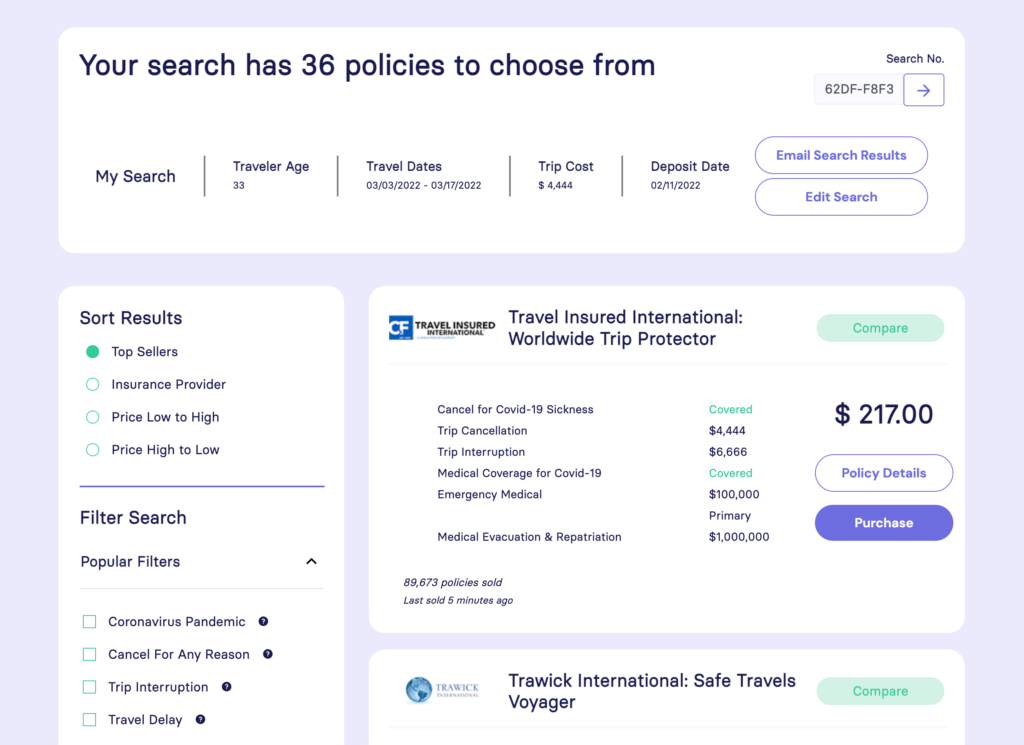
As you can see, there are a lot of results.
We need to narrow them down, and we will start by getting rid of plans that do not fit our needs. We’ll start by using the filters.
Step 3: Use Filters to hide plans that don’t fit your needs
Now, use the Filters on the left side to narrow down your choices based on what is important to you.
For example: if you know you want at least $100,000 of emergency medical coverage, you can check the ‘Emergency Medical’ box and select that amount. The screen will refresh and only show plans that meet your criteria.
This feature is very powerful when you want specific coverages or coverage amounts. You might want a certain amount of Evacuation coverage, Hazardous Sports coverage, or a plan with the Pre-existing conditions waiver.
The Preset Filters are handy for comparing travel insurance too.
For example: the Cruise option presets the Emergency Medical and Evacuation coverage at higher levels due to the additional risks of international travel and being isolated at sea.
Tip: Unless you have very specific coverage you’re looking for, just start by looking at the Popular Filters and the Preset Filters
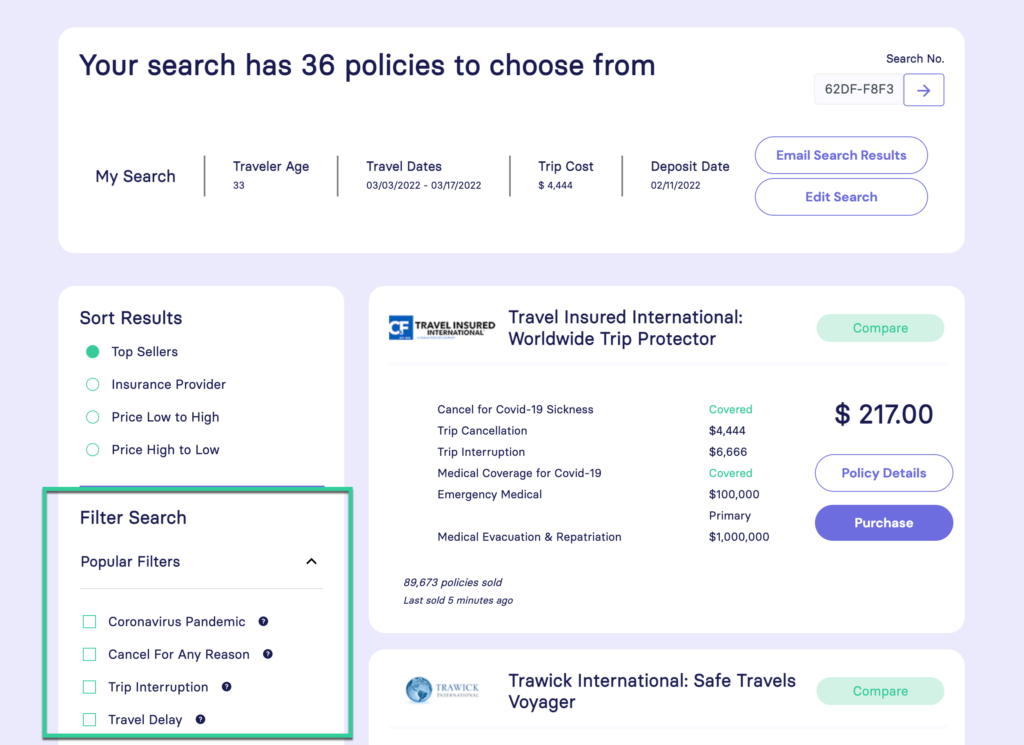
When you select any filter, the screen will refresh with updated results. Some filters, like Cancel For Any Reason, are upgrades and will also adjust the premium cost accordingly.
Tip: Since the start of the pandemic, the two most popular filters are Coronavirus Pandemic and Cancel For Any Reason.
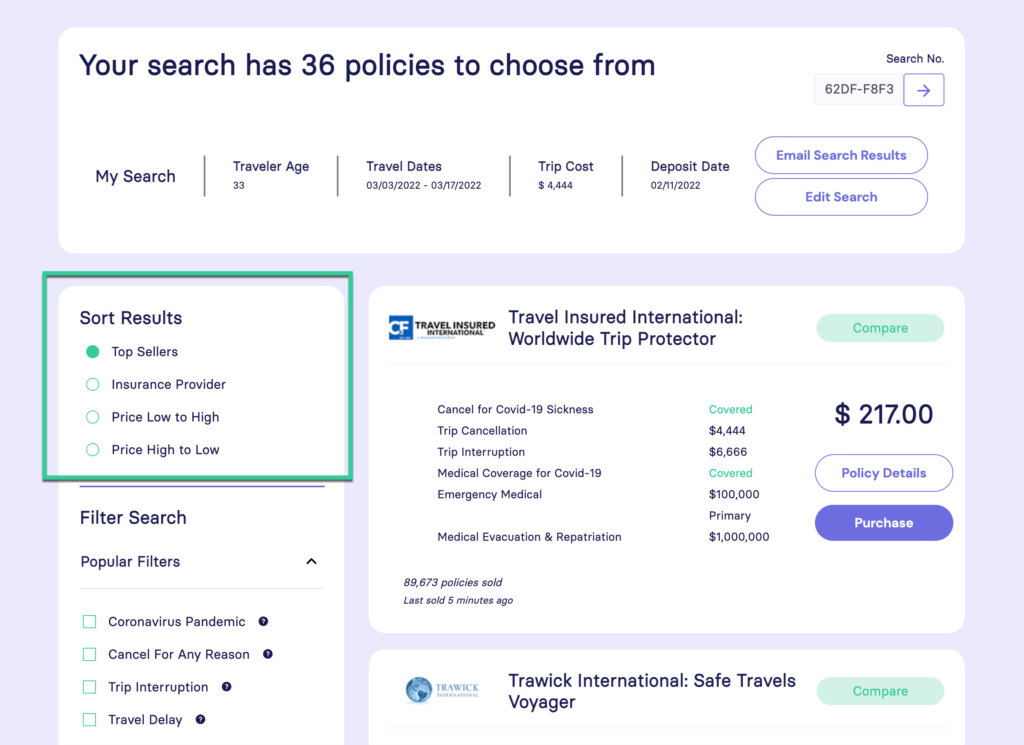
Step 4: Sort your the plans
The search results will default to showing Top Sellers first.
Top Selling plans stand in the middle of the pack. They tend to be neither the most expensive, or the least expensive. You can also sort the plans by price, and if you’re looking for a specific provider you can do that too.
Step 5: Simplified comparison on the results screen
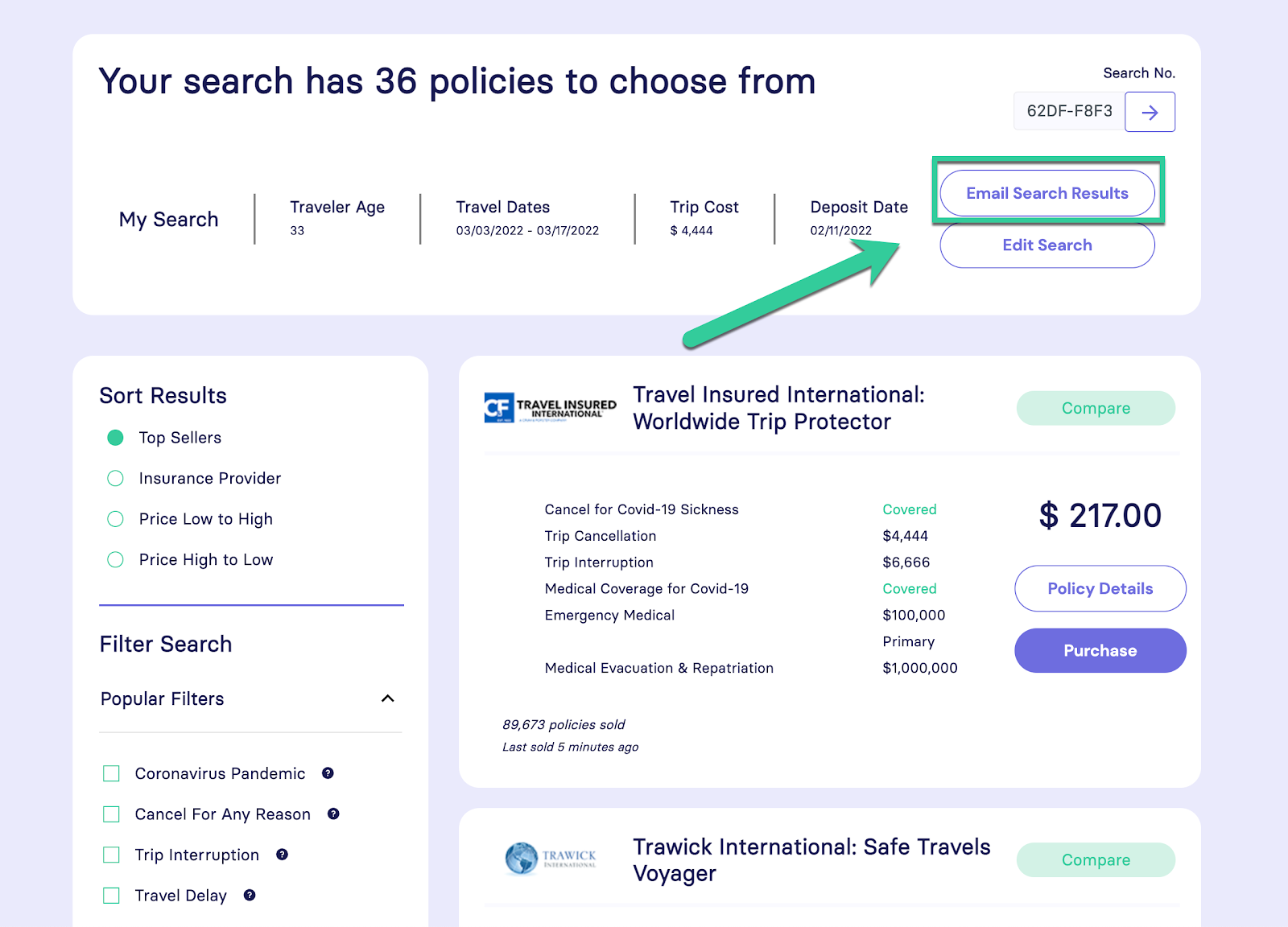
Now you can start looking at the plans and their coverage. Each listing shows the company logo, plan name, price, and an overview of the coverage amounts.
The main coverages listed include Cancellation, Interruption, Evacuation, Emergency Medical, and whether the medical coverage is Primary or Secondary.
It also highlights whether Covid-19 is covered for cancellation or medical emergencies. Most plans do cover this but not all, so it’s easy to find which ones do.
For more details about the plan, the Policy Details button will expand a window with full details.
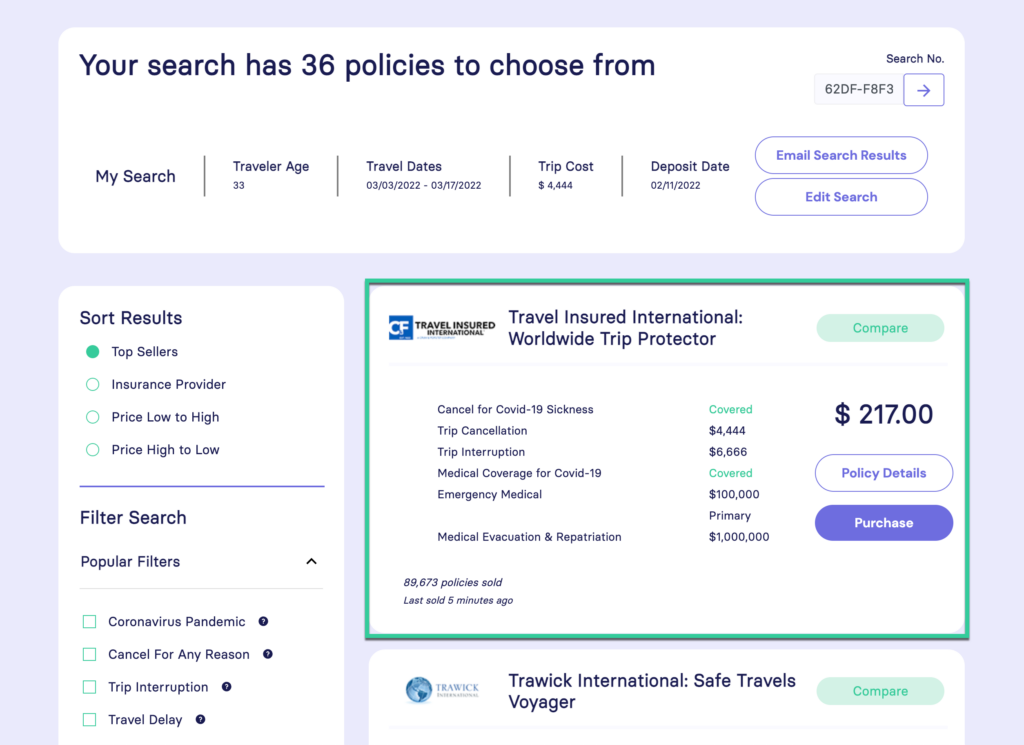
This is where you can purchase based on the key information shown here and the fact that these are the most popular plans.
Step 6: Detailed side-by-side comparison (optional)
If you want the full details, it’s time to really start narrowing the list using the side-by-side comparison feature.
Select up to 3 plans by clicking the Compare button.
Now your decision is coming down to price and coverage. Just because one plan is lower priced does not mean it’s a bad plan or company. Each company has a different premium system, so different plans with similar coverage can be significantly different in price.
Next, scan down the page and look at the coverage and compare travel insurance features. You can easily see the differences between the plans this way.For more information about a coverage, click the coverage listing or the More Details link.
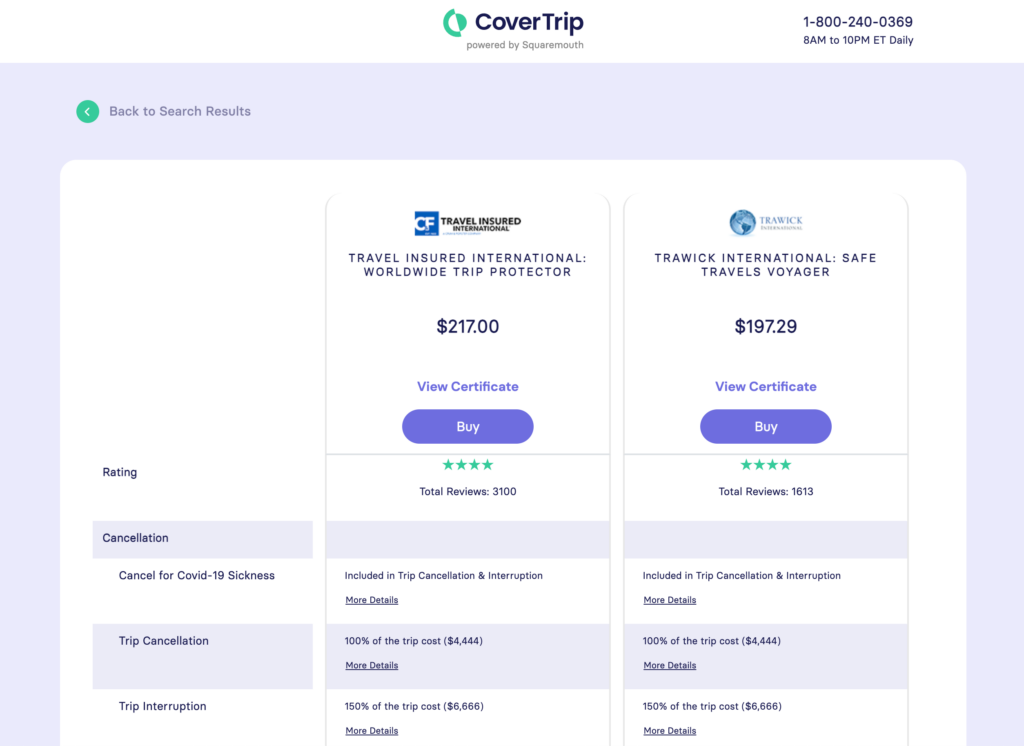
Also, if you decide a certain plan falls short you can click the Remove button at the bottom of the page. This will clear the plan off the screen to help you see your options.
Step 7: Complete your purchase online for immediate coverage confirmation
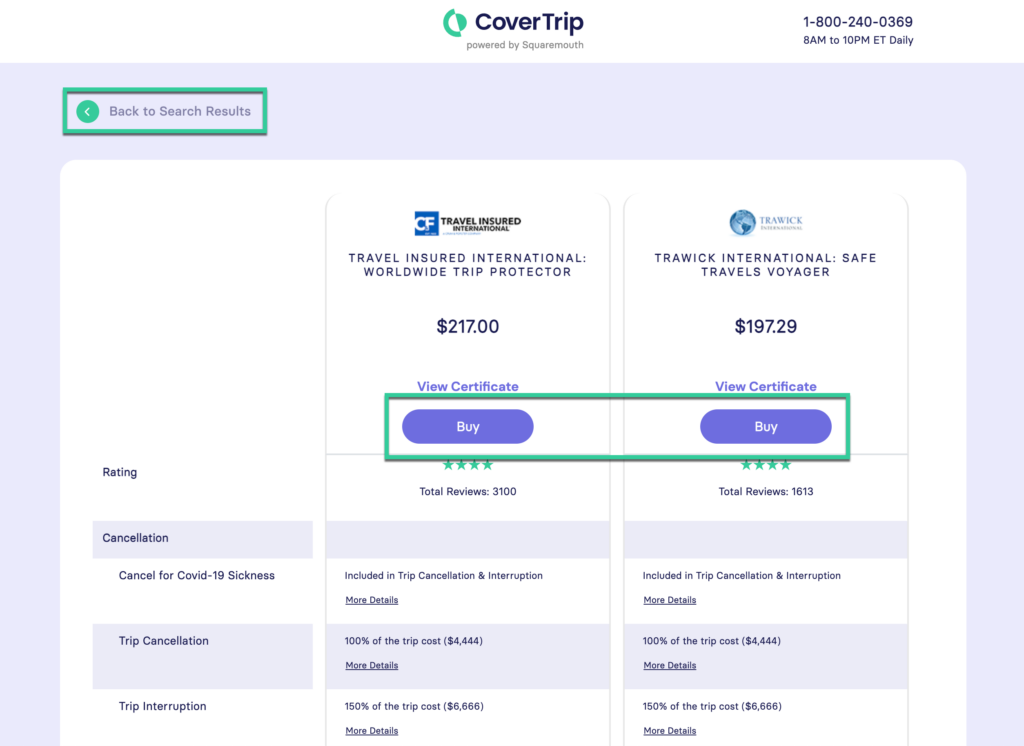
Finally, when you narrow down your choices and find a plan that fits your needs, you can enroll and purchase online.
Click the Buy button at the top of the listing, or return to the search results.
Note About Money Back Guarantee: Every plan comes with a Free Look period, which is essentially a money back guarantee. For some coverage, such as Pre-existing waiver or Cancel For Any Reason, you need to bind coverage soon after your initial trip payment. This allows you to get the plan in place, and if you decide to cancel your plan within this period you will receive a full refund of premium. Free Look Periods are typically 10-14 days.
Step 8: Finish secure purchase
On the next screen, you will be asked for your contact information, additional trip information, and payment information.
Coverage will be in place immediately, and you will receive an email with a confirmation.
This confirmation email has your policy information, important contact numbers, and coverage amounts.
It also has a PDF attachment with a single sheet description of coverage, which can be used as proof of insurance. This can be printed and carried with you on your trip
That’s all! Your travel insurance policy is now in place and you are covered.
Looking For Recommendations To Start Comparing Travel Insurance?
Above we showed you how to get quotes and compare plans using our comparison tool. But, the selection of plans can still overwhelm you so it’s helpful to have some general recommendations.
These plans are great overall plans that give you a lot of coverage for a reasonable cost. These are the plans that I would choose from or recommend to friends and family.
These are my criteria for picking the best travel insurance plans:
- Covid is covered for both sickness cancellation and emergency medical
- A minimum of $100,000 emergency medical coverage
- Primary emergency medical coverage (easier for claims)
- Emergency evacuation coverage is $250,000 min.
- Cancel For Any Reason is available
- Premium is 5-8% of trip cost (for most travelers)

Safe Travels Voyager
- Covid covered for sickness cancellation and emergency medical
- $100,000 Emergency Medical (Primary)
- $1,000,000 Medical Evacuation
- High coverage for Travel Delay ($2,000/person), and Baggage ($2,500/person)
- Great for: General travel, this is the top selling plan right now

Luxury
- Covid covered for sickness cancellation and emergency medical
- $100,000 Emergency Medical (Primary)
- $250,000 Medical Evacuation
- Weather coverage kicks in after a delay of any length of time, other plans require certain number of hours
- Includes Cancel For Work Reasons
- Great for: Overall great plan for most vacations and trips

Worldwide Trip Protector
- Covid covered for sickness cancellation and emergency medical
- $100,000 Emergency Medical (Primary)
- $1,000,000 Medical Evacuation
- Weather coverage includes NOAA hurricane warnings
- Great for: Cruises or any other trip that could be affected by hurricanes and weather.
Frequently Asked Questions (FAQs) on Comparing Travel Insurance Coverage
We’ve covered just about everything you need to know to start comparing travel insurance plans and pick your perfect policy. At this point, you should feel confident in getting started. But if you want to learn a bit more, check to see if we’ve answered any remaining questions you have in our frequently asked questions (FAQs) section:
How can I save my quote?
On the top-right corner of the results page you will see the Email Search Results button. You can return to this quote page at any time to complete your purchase.
How can I see the cost of the insurance policy?
The policy premium is listed on the main results screen above the Purchase button. If you’re just seeking the lowest travel insurance cost, we encourage you to check out our review of the cheapest travel insurance plans currently available – updated for this year and this specific month. It’s the most up to date resource on the internet!
Is there a return policy on travel insurance plans?
Yes, every plan comes with a Free Look period, which is essentially a money back guarantee. If you decide to cancel your plan within this period you will receive a full refund of premium, minus a small admin fee of around $8. Free Look Periods are typically 10-14 days.
What if I don’t know the exact trip dates or first booking date?
To get an idea of price you can use estimated dates here. Please note however, for the final policy to be accurate you will need exact dates for this.
What if I don’t know the exact trip amount? Or if the trip is not fully planned and booked?
Again, a ballpark with give you an idea of the price. It is also very common for people to have part of their trip booked but still have plans to make. In this case, it is best to buy a plan for the current known trip cost so you secure your coverage. Then, when you know more details/costs for your trip, you can contact the insurance company and have your policy adjusted. They will update the trip cost and ask for additional premium to cover the difference.
Where can I see the coverage to compare travel insurance plans?
One of the most important things to pay attention to when comparing policies is what each of the companies in question’s travel insurance cover. You can see the specific coverage in two ways: 1) On the main results screen under the policy premium, there is a button labeled Policy Detail, this will show you that individual plan’s coverage. 2) You can use the comparison feature (see above) to look at several plans at the same time, and this will also show you the coverage. So, if you’re looking for travel medical insurance, filter by that feature. Or, if you’re just after trip cancellation coverage, filter by that. Simple enough, right? For more information on coverage in general, check out our article titled, what does travel insurance cover?
Are these travel insurance companies reputable?
Every policy purchased through Squaremouth comes with the Zero Complaint Guarantee. In the event of a complaint, Squaremouth will mediate with the insurance provider on behalf of the client. Unless the complaint is resolved to Squaremouth’s satisfaction, the provider will be removed from the website.
Do I get an insurance card?
You will receive an email confirmation with a printable PDF. This can be printed and carried with you on your trip, and serves as proof of coverage. It also has important contact information, such as toll-free numbers to call in the event of a claim.
How do I compare insurance plans with pre-existing medical condition coverage?
If you have a pre existing medical condition, the coverage of medical expenses is going to be very important to you in selecting an insurance plan. As such, you want to filter by medical expenses coverage provided. Use the filters on the left to select Pre-existing Conditions. This will filter out any plans that do not cover this. Note: If there are no results shown it means there is no available coverage based on your request. This is usually because you are outside the purchase time window of 14-21 days depending on the company.
How do I compare insurance plans for cruises?
Use the pre-set filter on the left side to select Cruise. This will raise the minimums on medical and evacuation coverage. If you want to learn more about cruise insurance, take a look at our complete guide. This is a unique type of trip that has it’s own challenges and considerations.
How do I compare insurance plans for natural disasters and hurricanes?
Use the pre-set filter on the left side to select Hurricane & Weather. This will filter out plans without severe weather coverage. If you want to learn more about hurricane travel insurance, we put together an in-depth resource with all that you need to know.
Final Thoughts On How To Compare Travel Insurance Plans
Now that you know all that goes into comparing travel insurance plans, there is just one thing left to do – follow the steps we outlined above! You’re ready to starting comparing policies yourself so that you can find a plan that fits your budget and coverage preferences. We hope this guide helps you on your journey to find the right coverage. But if not, we wrote a complete guide breaking down the top rated travel insurance plans of the year. If you aren’t quite sure where to start, this resource is a great place. You can compare the plans in that resource and go from there.
Just remember – no matter what travel insurance providers you go with, you need to feel safe and secure in the policy you choose. The whole point of travel insurance is to grant you peace of mind and security as you prepare for your trip and go about your travels. And when you stick with the recommendations we provide you here at Cover Trip, you can do just that